
Family photos at home
Family photo ideas at home: a simple room-by-room shoot plan.
You need one bright corner, a steady phone and about 20 minutes together. Start with everyone in the photo, move to the sofa or rug for a relaxed variation, then take a few smaller combinations. Use the room you have, without turning the whole house into a studio.
Last updated
Lumo is a free, private family album for iPhone, iPad and Android. Send one link and the whole family can join.
Invited to a Lumo album? Open it in any web browser: app.lumomagic.com
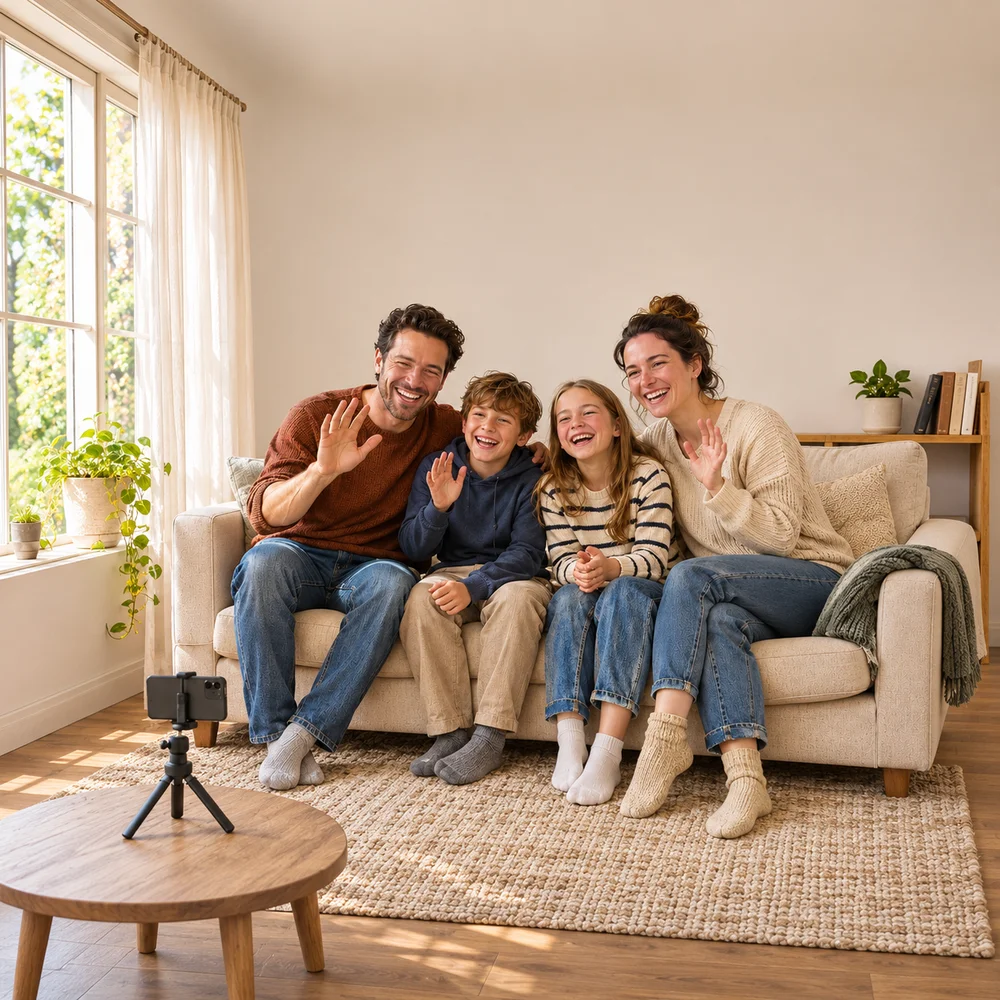
Choose one room and three nearby spots
Check the room at the time you plan to shoot. Pick a window with soft light rather than direct sun on faces. Start about a metre from it, with the window beside you and slightly in front. Turn off overhead lights if they make faces orange. Clear only what the camera sees: laundry, cables and objects behind heads.
| Spot | People and light | Phone and background |
|---|---|---|
| Window corner | Stand together facing into the room, turned a little towards the window. | Phone faces the group with the window off to one side. Keep a plain wall behind people. |
| Sofa | Sit close on the seats, angled towards the daylight. Keep every face visible. | Phone at seated eye level. Move a side table if it blocks the view; keep tripod legs out of the walkway. |
| Rug or floor | Sit together near the same window with a book or a simple game. | Lower the phone to face height. Keep the floor clear and leave room around hands and feet. |
Set the phone, then correct one test photo
Clean the lens, use the rear camera in ordinary Photo mode and start at 1×. Put the phone on a stable tripod or a secure support, never balanced near an edge. Frame a little wider than you need and mark your own place in the group.
Take a test with one person in place. If the frame cuts off their hands, move the phone back. If a bright window sits behind their head and the face is dark, turn the setup so the window lights them from the side. Enlarge the result to check the eyes are sharp before bringing everyone over.
Phone settings and framing, step by stepGive yourself time to join the group
Choose a timer delay long enough to reach your place without rushing. Rehearse the route once, then take several separate photos. A compatible watch or Bluetooth shutter remote can save repeated trips; test that it triggers the camera before everyone sits down. Timer controls vary by phone.
Find your phone’s timer or use a remoteYour 20-minute shot list
Treat the timings as a loose plan. If someone needs a break, shorten the session. One comfortable group photo is enough.
- Minutes 0–4: clear the chosen corner, secure the phone and correct the test photo. Leave a place for the person operating the timer.
- Minutes 4–8: take the whole-family photo first. Make one looking at the lens, then one looking at each other. Repeat each a few times.
- Minutes 8–12: move to the sofa or rug. Read a page together or ask someone to tell a short funny story. Photograph the reaction.
- Minutes 12–16: take two smaller combinations, such as siblings and a parent with each child. Let people choose who they sit beside.
- Minutes 16–20: take one detail, such as hands around a book, then check the full-group photos for closed eyes. Retake only what is missing and stop.
For two to four people: keep one close grouping
Use the sofa seats or sit on the rug with shoulders close and faces at slightly different heights. Try a gentle lean towards the middle, then look at each other. Keep children on the floor or securely seated beside an adult, not on sofa arms.
More family photo poses and hand placement ideasFor a bigger family: use two shallow rows
Seat a front row on chairs or the sofa and place a standing row just behind it. Offset each face into a gap and keep both rows close in depth. Check faces at both edges and in the back before every take. If the room is too narrow, shoot from an open doorway with the phone securely supported and the passage clear. Take smaller groups afterwards instead of squeezing everyone into a distorted wide-angle photo.
Arrange larger family groupsEdit lightly and keep the original files
Choose the best expressions before editing. Straighten the frame, crop distractions without cutting through hands, and adjust brightness gently until faces look natural. If skin looks too orange or blue, nudge warmth rather than applying a heavy filter. Compare with the original and save an edited copy. A blurred face is usually a reason to choose another frame.
Share the photos everyone likes
Choose a few favourites together. Lumo is an invite-only family photo album where relatives can add their own photos. The album is free under fair use and keeps the original files; free photo downloads are up to 2048px, while downloading originals requires Lumo Pass. Invite only the people you want in the album and agree which photos to share.
How a private family album worksCan we do a family photo shoot in a small living room?
Yes. Use one clear wall near a window and a seated arrangement. Move the phone into an open doorway if that gives you more distance. Keep faces away from the frame edges and leave access through the room clear. You do not need a separate backdrop.
What if the room is dark?
Try a brighter time of day and move the group nearer the window. Check a test photo for sharp faces. If people blur when they move, pause the activity for the photo or try another room with more daylight. Brightening a dark photo afterwards will not recover motion-blurred faces.
Do we need matching clothes or special equipment?
No. Comfortable everyday clothes and a securely supported phone are enough. Choose colours that stand apart from the sofa or wall, and avoid anything that needs constant adjusting. A tripod or remote is useful if you already have one, but the first test photo matters more.
Simple clothing ideas for family photosStart your family album.
Free. Private to your family. No ads, ever.