
Family photo poses
Family photo poses that don’t look posed.
The family photo poses that work best are simple: stand closer than feels natural, put heads at different heights, give everyone’s hands something to do, and then give the group something to react to instead of saying “cheese”. Below are 12 poses for groups of any size, from three people on a sofa to the whole family on the steps, and how to take them with a phone.
Lumo is a free, private family album for iPhone, iPad and Android. Send one link and the whole family can join.
Invited to a Lumo album? Open it in any web browser: app.lumomagic.com
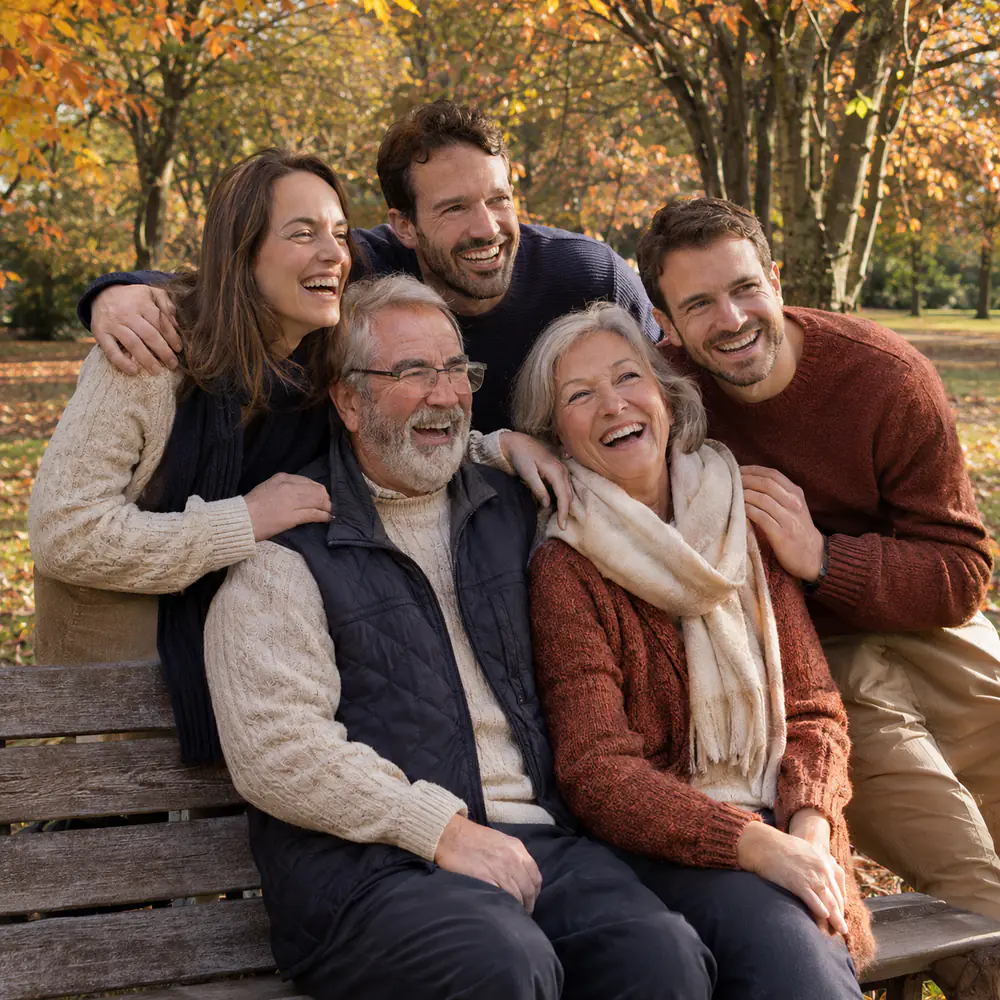
Four rules that fix most family photos
- Closer than feels natural. Gaps between people look much wider in a photo than they feel. Shoulders should touch.
- Heads at different heights. A straight row of heads looks like a line-up. Have some people sit, some stand, some lean in, so heads form triangles.
- Something for the hands. Arms around shoulders, a hand on someone’s back, hands in pockets, holding a mug. Hanging arms look stiff.
- Turn bodies slightly in. Everyone angled a little towards the middle of the group looks like one family, not people standing next to each other.
12 family photo poses to try
- The classic, softened: everyone standing, the tallest at the back, shoulders overlapping, arms around each other.
- Sofa or bench: two or three people sitting, the rest standing behind and leaning on the back, or perched on the arms.
- On the steps: one or two people per step, staggered so nobody hides anyone. It works for big families too.
- Generations together: grandparents in the middle, sitting, with their children and everyone else around them.
- Walking together: hold hands or link arms and walk slowly towards the camera, talking to each other. Take many photos.
- From behind: the same walk, away from the camera. No faces, lots of feeling, and nobody worries about their smile.
- Everyone looks at one thing: a photo, a phone, a cake, a view. Take the photo while they look and laugh.
- One person in the spotlight: everyone turns to look at Grandma, or at the person who just told the joke.
- Lying in a circle: heads together in the middle on a blanket or the grass, photographed from straight above.
- Hands only: a stack of hands on the table, or every hand holding a mug. Simple, and it fits any size of family.
- Couples and siblings: within the session, take smaller groups too: each couple, the brothers and sisters, a parent with each grown-up child.
- Recreate an old photo: find a family photo from years ago and take it again, same places, same poses. Show both side by side.
Poses by group size
Three people: make a triangle. One sits, two stand, or the middle person stands a step forward. Four people: two pairs, one pair sitting in front and one standing behind, slightly offset. Five or more: use height, a sofa, steps or a bench, and leave no gaps.
For ten or more, take the photo from a little higher than eye level, from a chair or a step, so the back row’s faces aren’t hidden. Count the faces before you press the button.

How to get real smiles
“Say cheese” makes a fixed smile. Instead, ask the group a question, ask everyone to whisper something to the person beside them, or count down and then don’t take the photo until a beat later, when everyone laughs.
Take a lot of photos. In a group of six, someone always blinks. Burst mode, or simply pressing many times, gives you one where everyone looks good.
How to take family photos with your phoneAfterwards: everyone’s photos in one album
On a day like this, photos end up on several phones: yours, the one used for the timer, an aunt’s, a cousin’s. A few get sent in the family chat, smaller than they were taken; most are never sent.
Lumo is a free, private family album where everyone adds the photos they took, in full quality, and everyone sees them. For a reunion or a holiday, make an event album and share its link or QR code, and relatives add their photos from their own phone or a browser.
How to collect photos from a group
How to pose a family photo
- Pick the place and the lightSoft light from the side: in the shade, by a window, or in the hour before sunset.
- Arrange heightsSome sit, some stand, some lean in. No straight lines, no gaps.
- Give everyone something to doArms around each other, a hand on a shoulder, walking, looking at one thing.
- Take many photosAsk a question, wait for the laugh, and keep pressing.
- Put them in one albumEveryone adds the photos they took to the family album, in full quality.
Questions
What is the most flattering pose for a family photo?
Standing close, bodies turned slightly in towards the middle, chins a little forward and the camera at or just above eye level. Heads at different heights look more natural than a row.
Where should the tallest person stand?
At the back or the side, never in the middle of the front row. If the tallest person must be in front, have them sit.
What should we do with our hands?
Give them a job: around someone’s shoulder, on someone’s back, in a pocket, holding hands, or holding something like a mug. Avoid arms hanging straight down.
How do we get everyone’s photos afterwards?
Make one album everyone adds to. In Lumo, invite the family once, or make an event album for the day and share its link or QR code. Photos stay in full quality and line up in the order they were taken.
Is Lumo free?
Yes. The family album, unlimited photos and videos, inviting family, and event albums for gatherings are all free, on iPhone, iPad and Android, and in a browser at app.lumomagic.com.
Start your family album.
Free. Private to your family. No ads, ever.