
Choosing a photo sharing app
The best private photo sharing apps, compared.
The best private photo sharing app is one where only the people you invite can see the photos, with no public feed, no followers and no algorithm choosing what anyone sees. Lumo, FamilyAlbum and Cluster are built around invite-only albums; Google Photos, iCloud and Amazon Photos share from your own library, album by album. We make Lumo, so every fact about the others below comes from their own pages.
Last updated
Lumo is a free, private family album for iPhone, iPad and Android. Send one link and the whole family can join.
Invited to a Lumo album? Open it in any web browser: app.lumomagic.com

What makes photo sharing private
Three questions tell most apps apart. Who can open the photos: only the people you invite, or anyone a link is passed on to? Is there a feed: do photos appear in order, or does an app decide what to show? And whose storage does it use: does sharing fill up one person’s space?
- Only invited people can see the photos
- No public profile, followers or feed
- Photos kept in full quality
- No ads
At a glance
Swipe the table sideways on a phone. Lumo is the first column.
| Lumo | Google Photos shared albums | iCloud Shared Albums | FamilyAlbum | Cluster | Amazon Photos | |
|---|---|---|---|---|---|---|
| What it is | One private album the whole family adds to | Album-by-album sharing from your own Google Photos library | Shared albums in Apple’s Photos app | A family album, sorted by month | Private group albums for friends and family | A photo backup with private Groups for sharing |
| Who can see the photos | Only the people in your album. Nothing is public and there are no followers | The contacts you share with. With a link, Google says “anyone with the link can view the photos and add to the album” | The owner chooses: only people they invite or approve, or anyone with the link | “Only family members you invite can see your album,” says FamilyAlbum | “Only invited users can see and post to albums,” says Cluster | The people you invite to a private Amazon Photos Group |
| How people join | An invite link, a QR code or a 4-digit family code, in the free app or in a browser at app.lumomagic.com, signed in with Apple, Google or email | Directly, for contacts with a Google Account; by link for everyone else | For albums made on iOS 27 or later: open the link on any device, or join and add photos on the web, even without an Apple Account | Invited by the family in the app | Invited by the people in the album; anyone can join and add photos in a web browser | Invited to a Group |
| Storage | Unlimited photos and videos, under fair use | Each Google Account’s free 15 GB is shared across Gmail, Drive and Photos; original-quality photos count toward it | Albums made on iOS 27 or later count toward the owner’s iCloud storage, including what others add. Older albums don’t, but hold up to 5,000 items | “No fees or storage limits”, and “Unlimited Photo and Video Storage” on the App Store | Not stated on its home page | 5 GB of full-resolution photo and video storage for every customer |
| Photo quality | The original of every photo is kept. Free saves are copies up to 2048 pixels; with Lumo Pass, everyone saves originals and watches every video in full | Original-quality backup is available, and counts toward storage | iOS 27 or later: originals at full resolution. Older albums: photos reduced to 2048 pixels on the long edge | Not stated on its home page | Not stated on its home page | Full resolution, within the storage |
| Ads | None, ever | Not mentioned on the pages checked | Not mentioned on the pages checked | Its App Store release notes list “In-app ads”, and its privacy label lists third-party advertising | Not mentioned on its home page | Not mentioned on the pages checked |
| Works on | iPhone, iPad, Android and any web browser | Android, iPhone, iPad and computers | iPhone, iPad and Mac; the web for everyone else (iOS 27 albums) | iPhone and Android | iPhone, iPad, Android and the web | iPhone, iPad and Android |
| Also does | Hearts and comments; Magic turns photos into coloring pages, cards and paintings | Backup of your whole camera roll, search and editing | Built into the Photos app, nothing to install on Apple devices | Comments, seeing who has viewed, and monthly free prints | Notifications, and seeing who has seen and liked a post | Automatic backup of your camera roll |
Checked on 8 November 2026 against each service’s own pages: Google Photos sharing help and Google storage help; Apple’s Shared Albums limits and sharing guide; family-album.com and FamilyAlbum’s App Store listing; cluster.co; and Amazon Photos’ App Store listing. They can change.
Google Photos is a trademark of Google LLC; iCloud and Photos of Apple Inc.; FamilyAlbum of MIXI, Inc.; Cluster of Fotoloce, LLC; Amazon Photos of Amazon.com, Inc. Lumo isn’t affiliated with any of them.
Which one suits you?
One private album that a whole family or group adds to, free, with no limit on photos or videos: Lumo or FamilyAlbum. Lumo keeps the original of every photo and long videos whole, and has no ads.
Shared albums for a few people who already use the same phones: iCloud Shared Albums among Apple users, Google Photos shared albums among Google users. Both share from one person’s library, and anyone a Google Photos link is passed on to can open that album.
Several separate albums for different groups of friends: Cluster, which lets you make as many albums as you like and invite different people to each.
A backup of your own camera roll that you also share from: Google Photos or Amazon Photos.
Family photo apps comparedHow Lumo keeps photos private
Lumo has no public side at all. There are no profiles to find, no followers and no feed: photos appear for the people in the album, in the order they were taken. Only people you let in can open the album, and you can turn an invite link off or remove someone at any time. To show one photo to someone outside the album, you can send a link to just that photo, and revoke it whenever you like.
Lumo keeps the original of every photo. Everyone sees a sharp viewing copy, and saving from the free album gives a copy up to 2048 pixels on its longer side. Lumo Pass, one optional subscription for the whole family, lets everyone save the originals exactly as they were taken and watch every video in full; without it, each video plays its first minute.
Guests don’t need to install anything: they can open the album in a browser at app.lumomagic.com. Everyone signs in with Apple, Google or email, so you always know who is in the album.
Lumo and Google Photos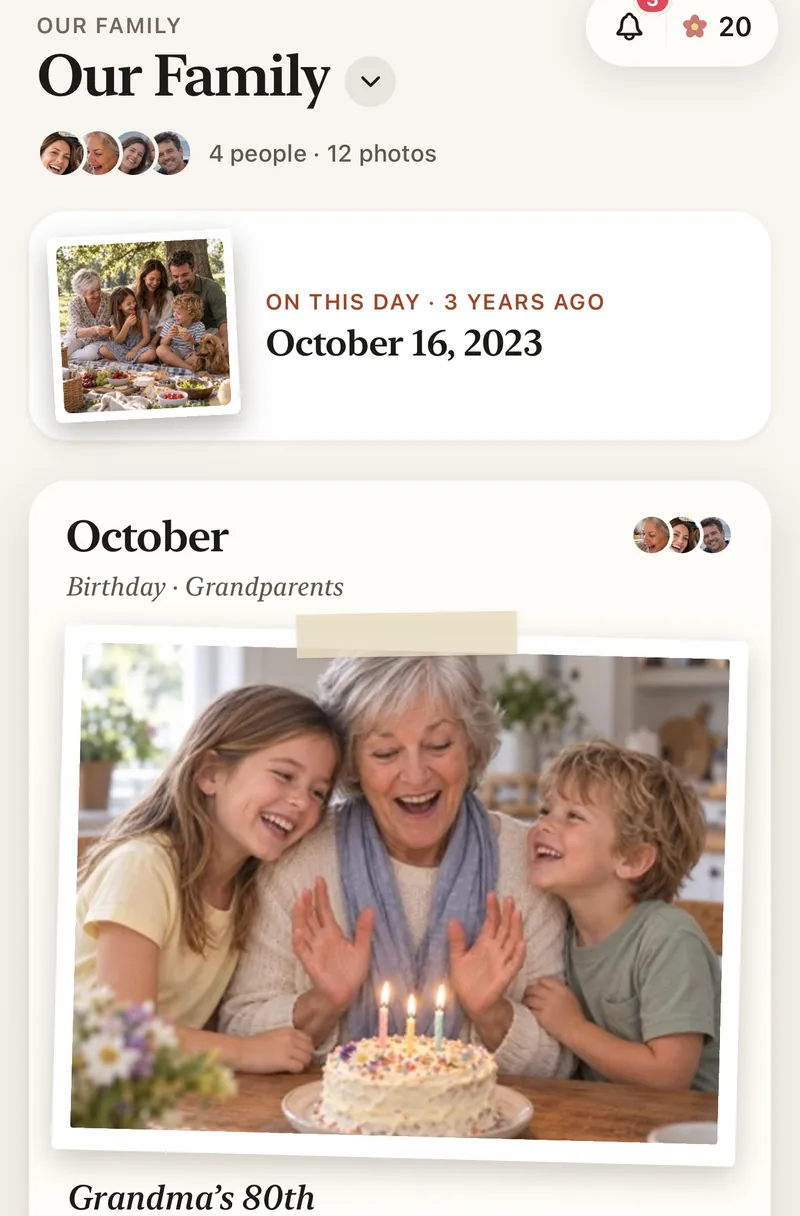
Questions
What is the most private way to share photos?
An album that only invited people can open, with no public profile, no followers and no feed. In Lumo, only the people in your album can see the photos. Everyone signs in, and you can turn an invite link off or remove someone at any time.
Is there a free private photo sharing app?
Yes. Lumo is free, with unlimited photos and videos under fair use, and no ads. Lumo Pass is optional, for saving originals, full-length videos and unlimited Magic.
Does Lumo keep my photos in full quality?
Yes. Lumo keeps the original of every photo. Saving from the free album gives a copy up to 2048 pixels on its longer side; with Lumo Pass, everyone can save the originals exactly as they were taken.
Do people need the app to see the photos?
No. They can open the album in any web browser at app.lumomagic.com and sign in with Apple, Google or email. The free app for iPhone, iPad and Android works too.
Can I share photos between iPhone and Android privately?
Yes. Lumo works the same on iPhone, iPad, Android and in a browser, so everyone joins one album whatever phone they have.
Where do these facts come from?
From each service’s own help pages, website and App Store listing, checked on 8 November 2026. If something has changed, write to contact@doola.ai and we’ll fix it.
Start your family album.
Free. Private to your family. No ads, ever.