
Troubleshooting
Shared album invite not working? Try these fixes.
An album invitation that never arrives is one of the most common family photo frustrations. Here are the usual causes on iPhone and in Google Photos, and how to fix them.
Free on iPhone, iPad and Android. Private to your family.
No app? Open your album in any web browser: app.lumomagic.com

iCloud shared album: the invite isn’t arriving
- Shared Albums is off: open Settings, tap your name, then iCloud, then Photos, and turn on Shared Albums. On iOS 27, check that iCloud Photos is on too.
- Wrong address: the invite has to go to the email or phone number of the Apple Account the person is signed in with.
- Different Apple Account: sign in to iCloud with the same Apple Account on every device.
- Old software: update to the latest iOS, then ask for the invite again.
Google Photos: the invite or link won’t open
- Another Google Account: open the invite while signed in to the account it was sent to, or ask for a link instead.
- Link sharing is off: the album owner can turn link sharing on in the album’s options.
- A supervised, school or work account: whoever manages the account may limit sharing.
- An old app: update Google Photos, then open the invite again.
Android and iCloud
Before iOS 27, Android phones couldn’t join an iCloud shared album, only view one shown on a public website. Albums made on iOS 27 or later can be joined in a web browser, so for a relative on Android, make the album on iOS 27 or later.
Sharing between iPhone and AndroidAn invite that works on any phone
Lumo’s invite is one private link that works on iPhone, iPad and Android: tap it, sign in, and you’re in the family album. Lost the link? Read out your 4-digit family code instead; it asks to join, and someone in the family lets them in.
Invite links stop working after 30 days, so an old link found in a chat doesn’t let anyone in, and you can turn the family code off once everyone has joined.
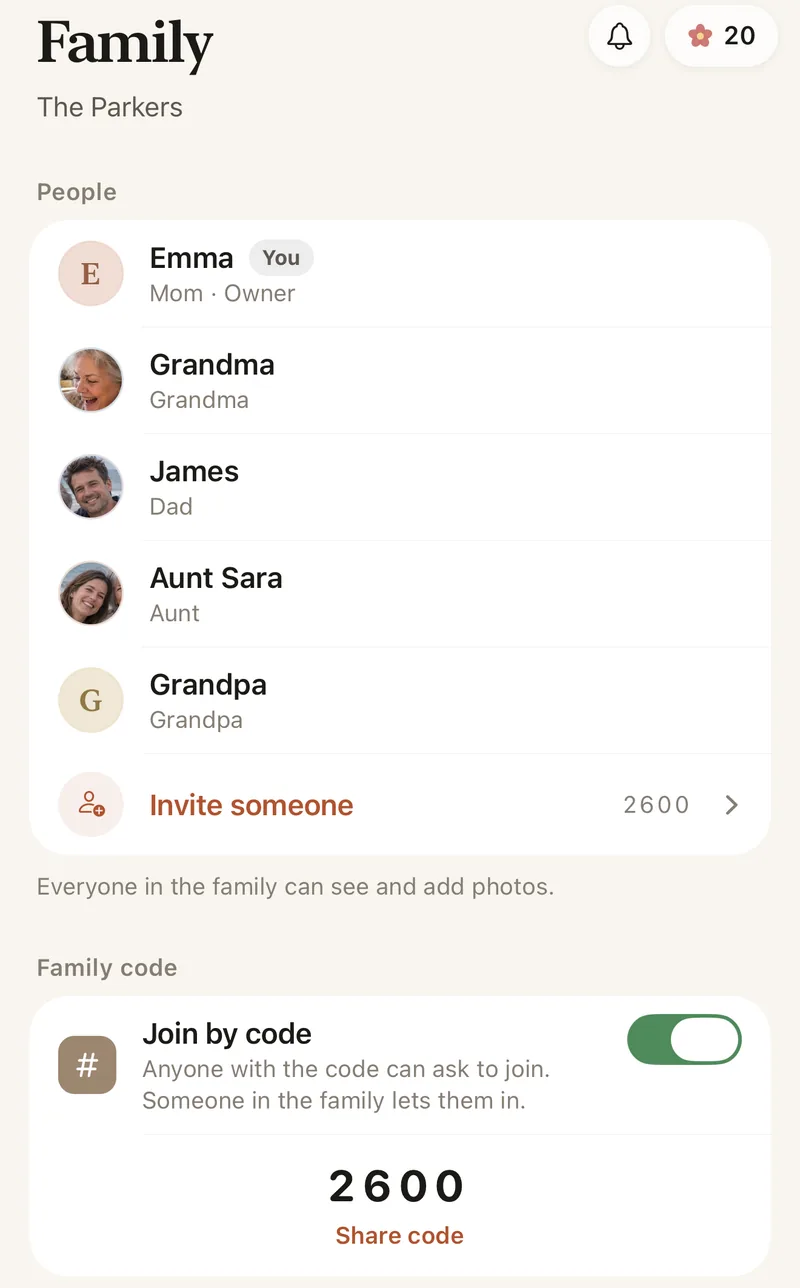
How to invite family to Lumo
- Open the Family tabTap Invite someone to make a private link.
- Send it any way you likeA message, an email, or the family chat.
- They tap and sign inOn iPhone, iPad or Android, and they’re in.
- Or use the family codeThey type the 4 digits to ask, and someone lets them in.
Questions
Why can’t I accept a shared album invitation on my iPhone?
Most often Shared Albums is turned off in Settings, or the invitation went to an address your Apple Account doesn’t use. Turn Shared Albums on, then ask for the invitation again at the right address.
Why does a Google Photos album say I need access?
You may be signed in to a different Google Account, or link sharing may be off. Open it in the account the invite was sent to, or ask the owner to turn link sharing on.
How do grandparents join?
Send them a private invite link and they tap it, or give them your 4-digit family code. A code only asks to join; someone in the family lets them in.
How does Lumo keep our photos safe?
Photos are encrypted in transit and at rest, and only signed-in members of your family album can open them. Invite links stop working after 30 days, a family code only asks to join, and you can turn the code off or remove someone at any time. There are no ads, and we don’t sell your data.
Where do these steps come from?
From Apple’s and Google’s own help pages, checked in October 2026. Menus can move a little between app versions.
Start your family album.
Free. Private to your family. No ads, ever.