
Free printable gift card
A family album gift for grandparents, with a card to give.
To give grandparents a family album, start the album in Lumo first, invite the family and add this year’s photos. Then print the free “We made you a family album” card, write your album’s name and your 4-digit family code on it, and put it in a holiday card or under the tree. When they open it, they scan the QR code to get the free app, type the code, and the photos are already waiting.
Lumo is a free, private family album for iPhone, iPad and Android. Send one link and the whole family can join.
Invited to a Lumo album? Open it in any web browser: app.lumomagic.com
Set up the album first
The present is the album, so fill it before the day. When they open it for the first time, this year’s photos should already be there. Start a week or two ahead:
- Get Lumo free on your phone and start a family album. Give it a name they’ll recognize, like your family name.
- In the Family tab, tap Invite someone and send the link to your brothers and sisters and anyone else who should be in it.
- Add this year’s favorite photos and a video or two, and ask everyone to add theirs. You can gather them in an album of their own inside the family album, such as “Our year”.
- Find your 4-digit family code in the Family tab. That’s what goes on the card.

Download the card
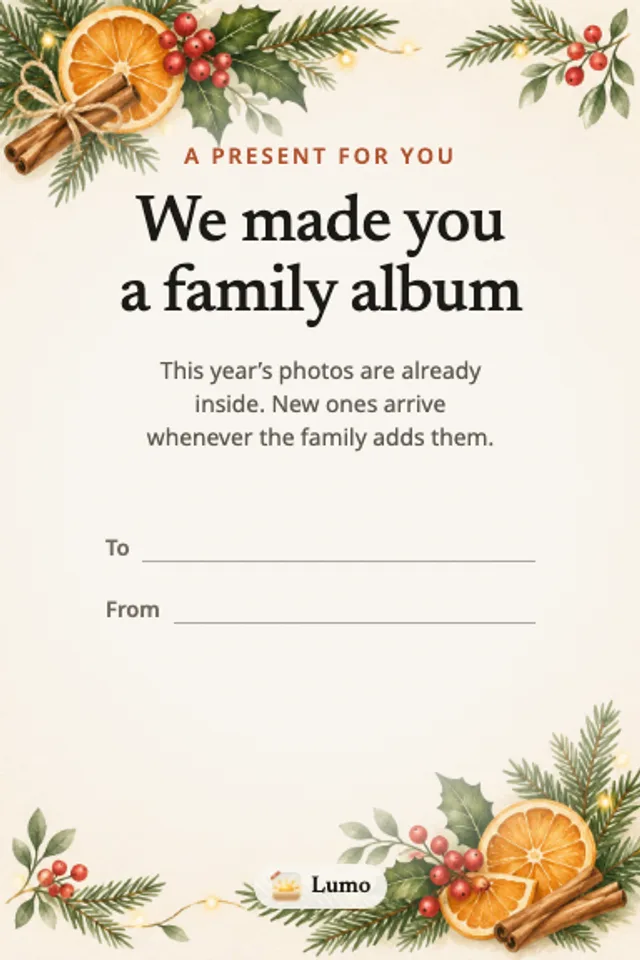
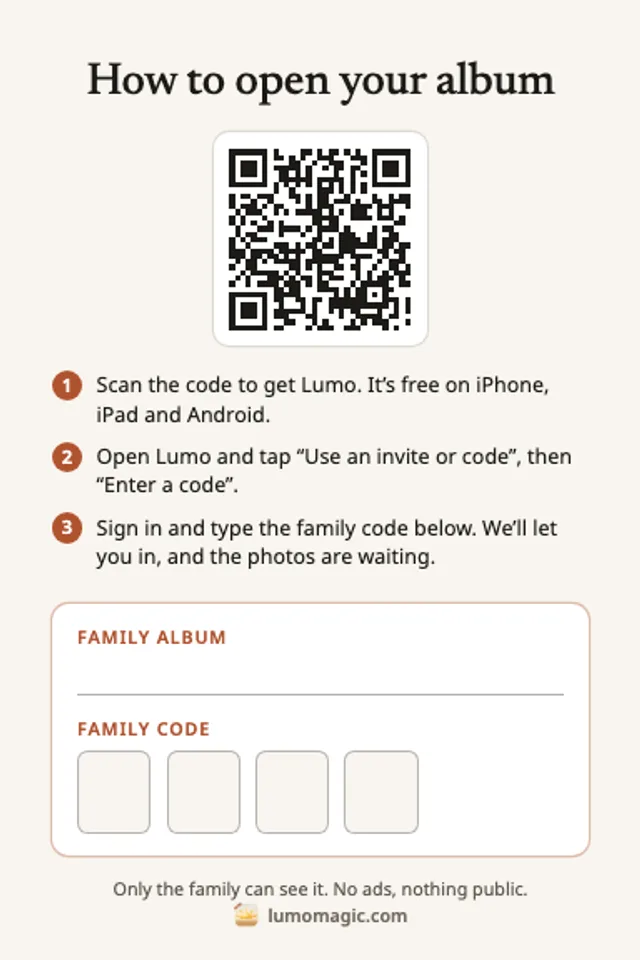
The front says “We made you a family album”, with space for who it’s to and who it’s from. The back has a QR code to get the app, three short steps, and blanks for your album’s name and family code.
US Letter (PDF) · A4 (PDF) · For a print shop, 4×6 in and A6 (PDF)
The US Letter sheet makes a folded 4×6 in card and the A4 sheet a folded A6 card: print at 100% on card, cut along the outer line and fold in the middle. The inside stays blank for your own message. The print shop file has a front and a back in each size, with 3 mm of bleed, for a flat two-sided card.
Fill it in and give it
- On the front, write who it’s for and who it’s from.
- On the back, write your family album’s name and the 4 digits of your family code, one digit to a box. Copy the code from the Family tab so it matches.
- Put the card in a holiday card, tuck it into another present or leave it under the tree. It can go in the post, too, if you won’t be there on the day.
How long the code works
The family code stays the same until someone in your family turns it off, so a card written in November still works at New Year. If the code is ever turned off and on again, Lumo makes a new one: write the new code on the card.
There’s no invite link on the card on purpose. Invite links stop working after 30 days or once they’re used, and a card can wait in a drawer for longer than that.
When they open it
They scan the QR code with their phone camera to get Lumo, free from the App Store or Google Play. In the app, they tap “Use an invite or code”, then “Enter a code”, sign in with Apple, Google or email, and type the 4 digits.
A request comes to the family. Anyone in the family can tap to let them in, unless you’ve turned on “Only admins can let people in”. Then this year’s photos are there, and new ones arrive whenever the family adds them.
If you’re with them, do it together on their phone; it takes about ten minutes. If you’re far away, call them while they open it and let them in from your phone.
Setting up the album with your parents, step by stepHow to give a family album as a present
- Start the albumFree in Lumo, on iPhone, iPad or Android.
- Add this year’s photosInvite the family and fill it before the day.
- Print the cardOn US Letter or A4, or at a print shop.
- Write the name and codeYour album’s name and your 4-digit family code.
- Give it, then let them inTap their request when it comes.
Questions
Is the card free?
Yes. Download it and print as many as you like. The family album in Lumo is free too.
Does the family code expire?
No. It stays the same until someone in your family turns it off. Turning it back on makes a new code, so check that the card matches the code in your Family tab before you give it.
Can anyone who finds the card see our photos?
No. The code only asks to join. Someone in your family has to let the person in, and you can remove anyone at any time.
Do they need a new phone or tablet?
No. Lumo works on the iPhone, iPad, or Android phone or tablet they already have.
Who can see the photos?
Only the people in your family album. Nothing is public, there are no followers, and there are no ads.
Start your family album.
Free. Private to your family. No ads, ever.